


A well-structured page-line deposition summary connects specific testimony to exact transcript locations, giving you the precise citations you need for motions for summary judgment, motions to compel, and pretrial briefs. Unlike narrative summaries that require you to hunt through prose for relevant statements, the page-line format lets you locate and cite testimony in seconds.
This guide walks through the page-line format, shows you how to fill one out effectively, and covers the verification steps that ensure your summary holds up when opposing counsel checks your citations.
What Is a Page-Line Deposition Summary
A page-line deposition summary organizes testimony by exact transcript citations, connecting specific statements to their precise locations in the original deposition. Each entry includes the page and line numbers—like 25:14-19—alongside a brief summary of what the witness actually said. This format differs from narrative summaries, which present testimony as flowing prose without specific citations.
The page-line format has become a go-to approach for motion practice because it lets you locate and cite testimony without digging through hundreds of transcript pages. When you’re drafting a motion for summary judgment or putting together a pretrial brief, having testimony organized with precise citations can save you hours. For a deeper walkthrough of the drafting process itself, see our guide on how to draft a page-line deposition summary.
Here’s the key terminology you’ll run into:
- Page-line citation: The exact location in the transcript, written as page number followed by line numbers (e.g., 45:10-15)
- Topic tag: A category label that groups testimony by legal issue or subject matter
- Deponent: The witness who gave the testimony being summarized
Why Page-Line Deposition Summaries Work Best for Motion Practice
The page-line format offers real advantages when you’re preparing motions. Understanding why this format works helps explain why most litigation teams choose it over narrative alternatives.
Quick Reference for Specific Testimony
During motion drafting, you’ll often find yourself hunting for a particular statement or admission. A page-line summary works like an index—scan the topic column, find the relevant entry, and you’ll know exactly where that testimony lives in the original transcript. This becomes especially helpful when you’re juggling multiple depositions across a complex case.
Precise Citations for Legal Briefs and Motions
Courts require exact page and line references when you cite deposition testimony in filed documents. With a page-line summary already prepared, you can pull citations directly into your brief without going back to the transcript. Accuracy matters here because opposing counsel will check your citations, and errors can undermine your credibility fast.
Flexible Organization by Topic or Chronology
While the summary follows the transcript’s page order, the topic column lets you filter and sort entries by legal issue. You might tag entries as “Liability,” “Damages,” or “Contradictions”—whatever categories fit your case theory. This dual organization gives you both chronological context and topic-based access when you need it.
Try a Page-Line Deposition Summary for Free
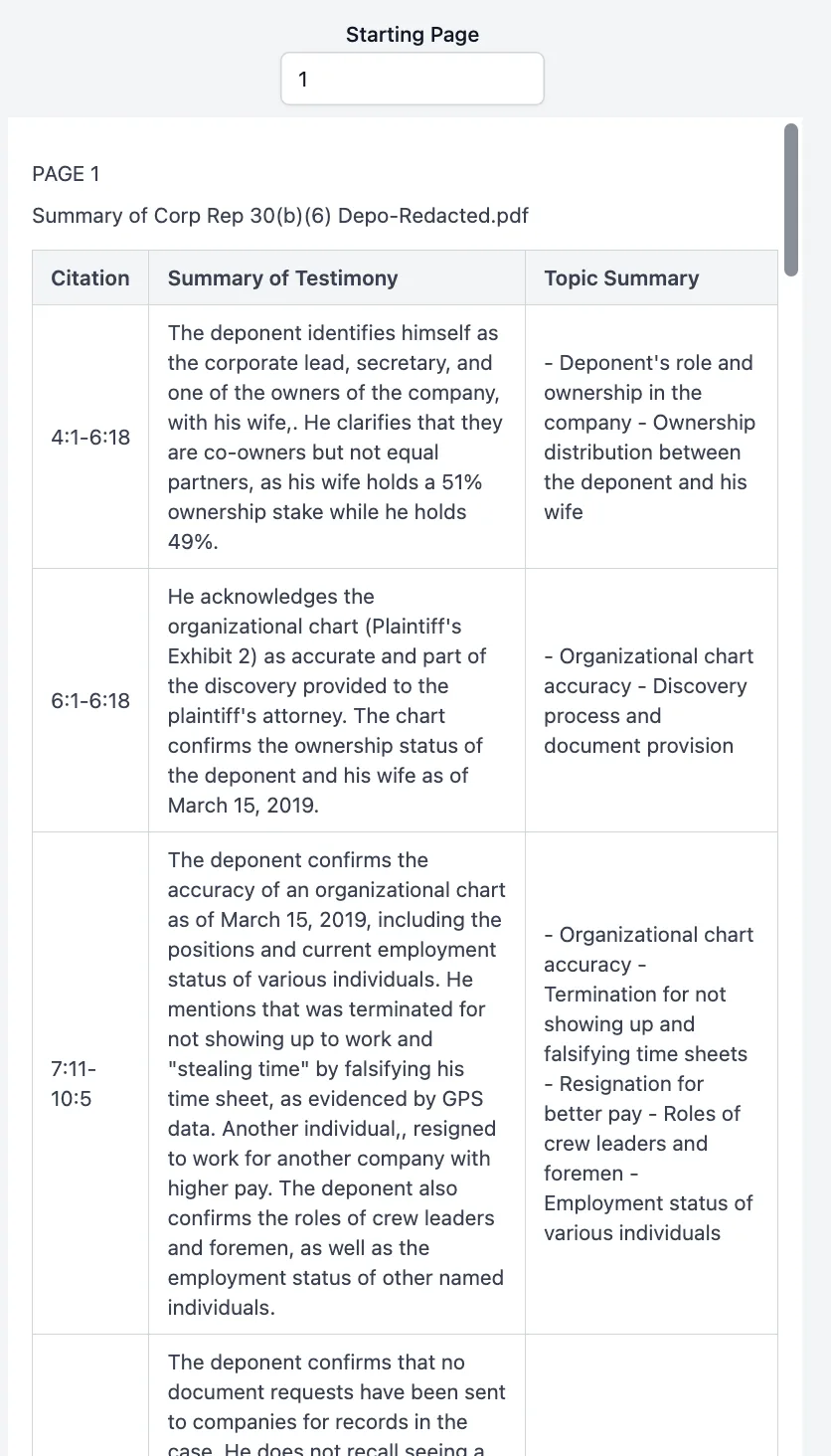
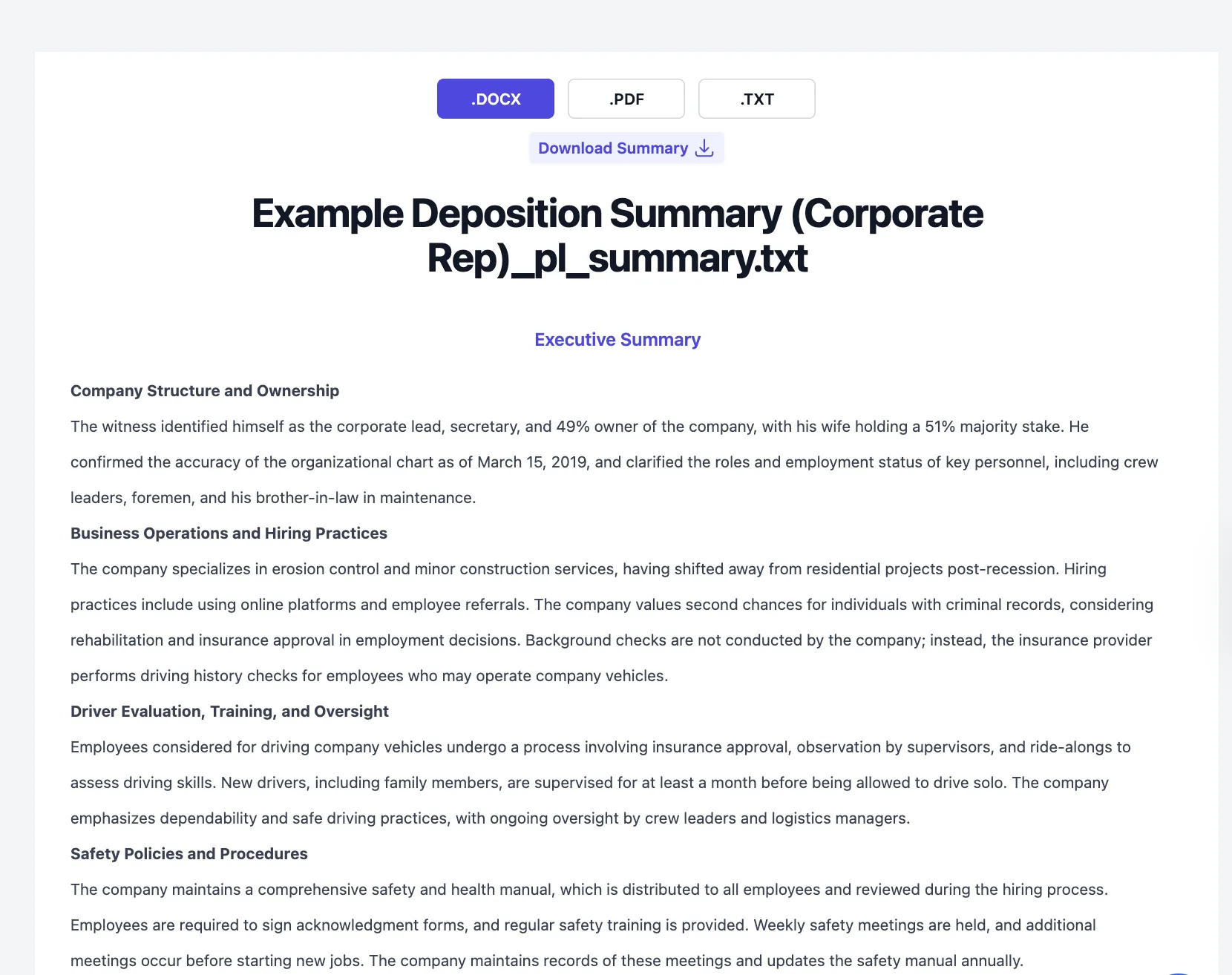
Rather than starting from a blank template, you can generate a complete page-line deposition summary by uploading a transcript to Dodon.ai. The platform produces a structured table with Citation, Summary of Testimony, and Topic Summary columns—the same format covered in this guide—along with an executive summary you can export as .DOCX, .PDF, or .TXT.
Try Dodon.ai free with your own transcript
Template Fields and Columns Explained
The core columns that make a page-line deposition summary effective for motion prep:
| Column | Purpose | Example Entry |
|---|---|---|
| Page:Line | Exact transcript location | 45:12-18 |
| Topic/Issue | Category for filtering | Negligence |
| Summary | Condensed testimony | Witness states defendant was texting while driving |
| Notes | Flags for motion relevance | Key admission—use in MSJ |
The Notes column is particularly useful for flagging impeachment material, contradictions with other witnesses, or testimony that directly supports a specific motion argument.
Customizing the Template for Different Case Types
You can add or remove columns based on your practice area. Personal injury cases might benefit from a column tracking medical terminology or treatment dates. Employment litigation often calls for timeline tracking for discriminatory acts. Commercial disputes may work better with columns linking testimony to specific contract provisions.
Think of the template as a starting point—whether you’re working in Word, Google Docs, or directly inside Dodon.ai. Adjust it to match how you actually use deposition testimony in your motions.
How to Fill Out the Deposition Summary Template Step by Step
Creating an effective page-line summary follows a consistent process. Here’s how to work through a transcript efficiently.
Step 1. Enter Case Information and Witness Details
Start by completing the header section with the case caption, court, deposition date, and deponent’s name and role. Include the names of attorneys present. This information helps anyone reviewing the summary understand the context right away.
Step 2. Identify Key Topics and Issues From the Transcript
Before diving into line-by-line summarization, read through the transcript once to spot major themes. Create a list of topic categories that align with your case theory—these become your tags in the Topic column.
Common categories include:
- Liability
- Damages
- Timeline
- Prior knowledge
- Contradictions
If you’re using Dodon.ai, you can enter these key topics when you generate an AI deposition summary so the system gives added focus to testimony that matters for your issues.
Step 3. Record Accurate Page and Line Citations
As you work through the transcript, record the exact page and line range for each significant piece of testimony. Double-check the numbers as you go. It’s much easier to verify accuracy during initial entry than to fix errors later when you’re under deadline pressure.
Step 4. Summarize Testimony Concisely in Your Own Words
Capture the substance of what the witness said in one to two sentences. Stay objective and avoid editorializing.
Your summary might read “Witness admits she did not review the contract before signing” rather than “Witness carelessly failed to review the contract.” The goal is factual accuracy, not advocacy—save the characterization for your brief.
Step 5. Add Notes Flagging Motion-Relevant Testimony
Use the Notes column to mark entries that deserve special attention. Flag admissions against interest, statements that contradict other evidence, testimony supporting specific motion arguments, or potential impeachment material. The flags help you quickly locate your strongest evidence when drafting.
Sample Deposition Summary Examples in Page-Line Format
Seeing completed examples helps clarify how the template works in practice. Below are samples from two common case types.
Personal Injury Deposition Summary Sample
| Page:Line | Topic | Summary | Notes |
|---|---|---|---|
| 23:5-12 | Accident | Plaintiff states she was looking at her phone when she first noticed defendant’s vehicle | Comparative fault argument |
| 45:18-46:3 | Injuries | Plaintiff describes ongoing back pain that prevents her from lifting her children | Damages—emotional impact |
| 67:14-22 | Prior injuries | Plaintiff admits previous back injury from 2019 car accident | Causation challenge |
Employment Litigation Deposition Summary Sample
| Page:Line | Topic | Summary | Notes |
|---|---|---|---|
| 34:8-15 | Timeline | Supervisor confirms performance review occurred two days after plaintiff filed HR complaint | Temporal proximity for retaliation |
| 56:22-57:8 | Comments | Supervisor denies making age-related comments but admits discussing “fresh perspectives” from younger employees | Potential pretext evidence |
| 89:3-11 | Policy | HR director confirms no written policy existed for the termination procedure used | Deviation from standard practice |
Verification Steps to Ensure Deposition Summary Accuracy
Quality control protects you from embarrassing errors and ensures your summary holds up under scrutiny. The verification steps below take time upfront but prevent problems later.
Cross-Check Page and Line Numbers Against the Transcript
Go back to the original transcript and verify that each citation actually corresponds to the testimony you’ve summarized. Transcription errors happen, and a misplaced citation can undermine your credibility with the court.
Confirm Summaries Accurately Reflect Original Testimony
Read your summary alongside the original testimony to make sure you haven’t inadvertently changed the meaning. Watch for subtle shifts—a witness who says “I don’t recall” is different from one who “denies” something.
Review for Completeness and Key Testimony Coverage
Scan your summary for gaps. Did you capture all the testimony relevant to your motion arguments? Are there topics you expected to find that aren’t represented? Sometimes a second pass through the transcript reveals important testimony you initially overlooked.
Validate Formatting Consistency Across All Entries
Check that all entries follow the same citation format, use consistent topic labels, and maintain similar levels of detail. Inconsistent formatting makes the summary harder to use and suggests careless preparation.
How AI Deposition Summaries Accelerate Motion Prep
AI-powered tools can generate page-line summaries in minutes rather than hours. The typical workflow involves uploading your transcript (PDF, TXT, or Word), selecting the page-line format, optionally entering key topics, and downloading a draft summary that you then review and refine.
The tools work best as a starting point rather than a final product. AI handles the time-consuming work of reading through pages of testimony and extracting key statements, while you provide the legal judgment to verify accuracy and flag what matters for your specific motion.
- Time savings: AI processes transcripts faster than manual summarization
- Consistency: Automated formatting ensures uniform page-line citation style
- Verification still required: AI-generated summaries benefit from human review for accuracy
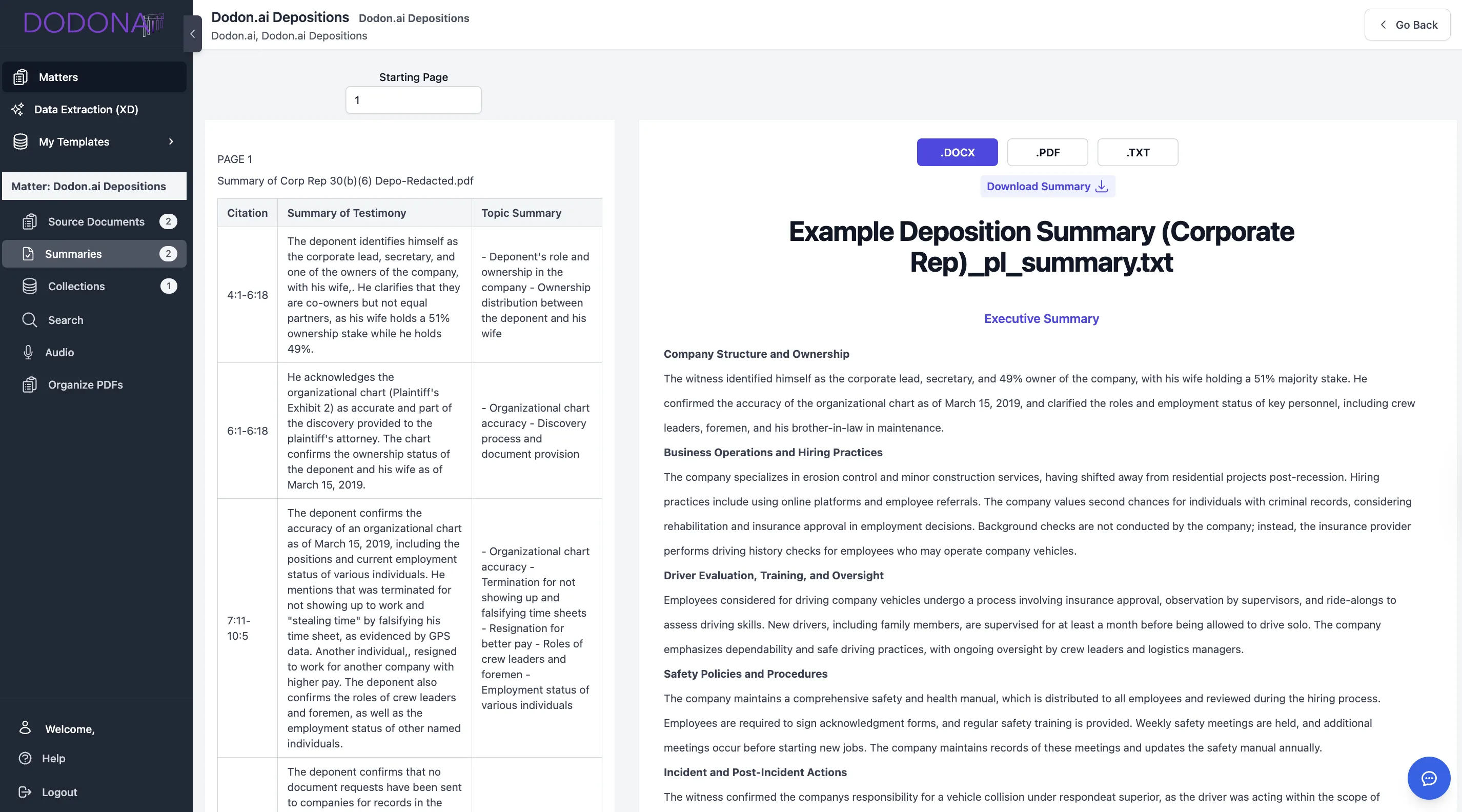
Dodon.ai offers AI deposition summary software that generates page-line and narrative deposition summaries with page-line citations. Inside the platform, those citations are tied back to the underlying transcript so you can quickly confirm what was said before you rely on it in a motion.
Build a Faster Deposition Summary Workflow With Dodon.ai
Creating deposition summaries manually remains one of the most time-intensive tasks in litigation support. Dodon.ai’s deposition summary software combines AI efficiency with the structured page-line format that motion practice demands.
The platform handles transcript processing, page-line citation formatting, and initial summarization—leaving you to focus on the legal analysis that actually requires attorney judgment. You can also use Dodon.ai for narrative deposition summaries, as well as medical record chronologies and other litigation support workflows, all from the same interface.
Frequently Asked Questions About Deposition Summary Templates
How long should a page-line deposition summary be?
Most page-line summaries condense transcripts to roughly one-fifth to one-tenth of the original length. A 200-page deposition might yield a 20-40 page summary, though the length varies based on how much testimony is actually relevant to your case issues.
Can I use the same deposition summary template for different case types?
Yes, a single template structure works across practice areas. You’ll typically customize the topic categories and possibly add case-specific columns, but the core page-line format remains consistent whether you’re working on personal injury, employment, commercial, or other litigation.
What is the difference between a page-line summary and a narrative deposition summary?
A page-line summary organizes testimony in a table with exact page-line citations, while a narrative summary presents testimony as flowing prose without specific page references. Page-line works better for motion practice where precise citations matter. Narrative summaries sometimes work better for case overviews or client communication.
How do I handle unclear or inaudible testimony in my deposition summary?
Note unclear portions with a bracketed reference like ”[inaudible]” or ”[unclear]” and include the page-line citation. This alerts anyone using the summary that they may want to review the original transcript or check the audio recording if one exists.
Should I include objections and attorney colloquy in the deposition transcript summary?
Generally, exclude routine objections and colloquy unless they’re substantively relevant. If an objection led to an instruction not to answer, or if the colloquy reveals something important about the testimony’s context, include it. Otherwise, focus on the witness’s actual statements.
Learn More About Dodon.ai
See how Dodon.ai Deposition Summary Software automates citation-ready summaries for motion practice, or explore how it extends to AI Medical Record Summaries and Chronologies for full-case prep efficiency.