


Your associate forwards a deposition summary. You copy key points into your motion outline. Then you wonder: Did I just cite something out of context?
That’s the real risk with deposition summary software. Not accuracy. Verification speed.
If the software makes verification easy, teams use it. If it doesn’t, the summary becomes another document that still requires full re-review—and you’ve saved nothing.
This post breaks down the practical checks litigation teams run before they rely on deposition summary software, and the workflow cues that signal the output is safe to use for litigation prep. (Still evaluating tools? See our buyer’s guide to choosing deposition summary software.)
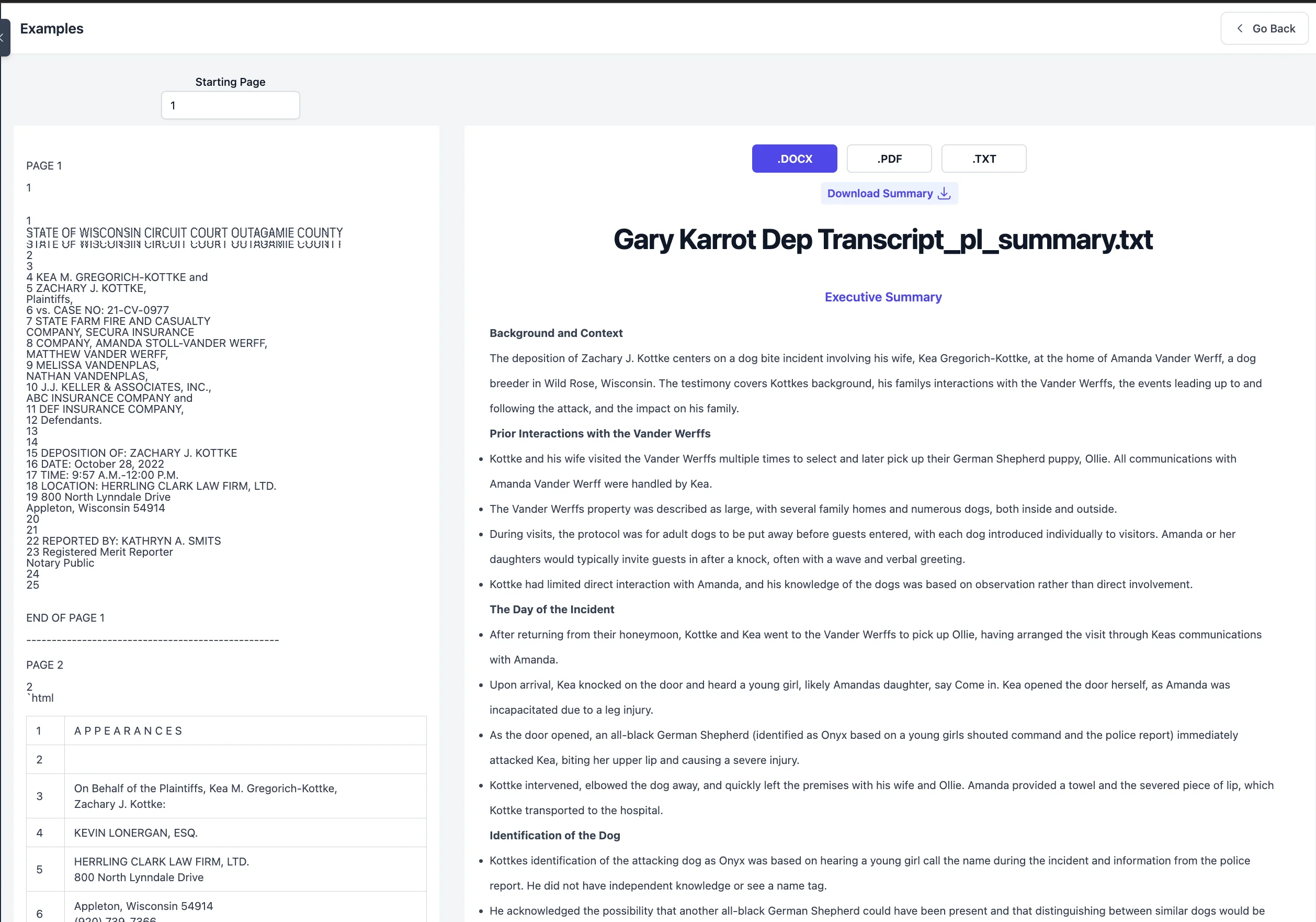
App: Gary Karrot PL Summary View
Why Litigation Teams Need Reliable Deposition Summary Software
A deposition summary is not evidence. It supports preparation: issue spotting, motion outlines, witness prep, settlement strategy, and internal alignment on what the testimony actually said.
Reviewers treat a summary as useful when it speeds up those tasks without forcing the team into a second full read.
The most trusted summaries share one trait: they show their work, meaning each key point can be traced back to the source page and line.
7 Features Reviewers Check in Deposition Summary Software
1) Does it provide page-line citations on the claims that matter?
Reviewers scan for citations on the items most likely to be used later:
- admissions
- denials
- timeline facts (dates, sequence, what happened when)
- core liability or causation points
- damages-related facts (work limitations, symptoms, treatment references)
A summary that gives citations only “sometimes” forces manual cleanup. A summary that attaches page-line citations to each key point makes verification a standard habit, not a special effort. For a plain-English breakdown of the citation format, see Page-Line 101: What Your Partner Means When They Ask for Citations.
Reviewer tell: citations appear where the summary makes assertions.
2) Can reviewers spot-check quickly (without hunting through the transcript)?
Verification is a behavior, not a promise. Teams don’t rely on marketing claims. They rely on a workflow that makes it easy to confirm what matters.
The workflow should support this pattern:
- read the summarized point
- open the cited page/line reference
- confirm the context
- keep moving
If the software forces too many steps (download, search, scroll, guess where the passage is), reviewers stop verifying and confidence drops.
What “good” looks like: the summary makes it easy to go from a claim → to a page/line reference → back to the summary.
Without page-line citations: 45–60 minutes to verify a 200-page deposition summary (searching, scrolling, cross-referencing).
With linked page-line citations: 5–8 minutes to spot-check the same summary (click, confirm, continue).
View how page-line citations work in practice →
3) Does it make it clear what’s summarized vs what’s quoted?
Reviewers want to know what’s a summarized interpretation and what’s verbatim testimony.
Different teams handle this differently in practice. The reliable standard is not a specific “quote block format,” it’s that material statements are anchored to page-line references so reviewers can confirm wording and context before reuse.
Reviewer tell: you can verify the key statements quickly without guessing what was actually said.
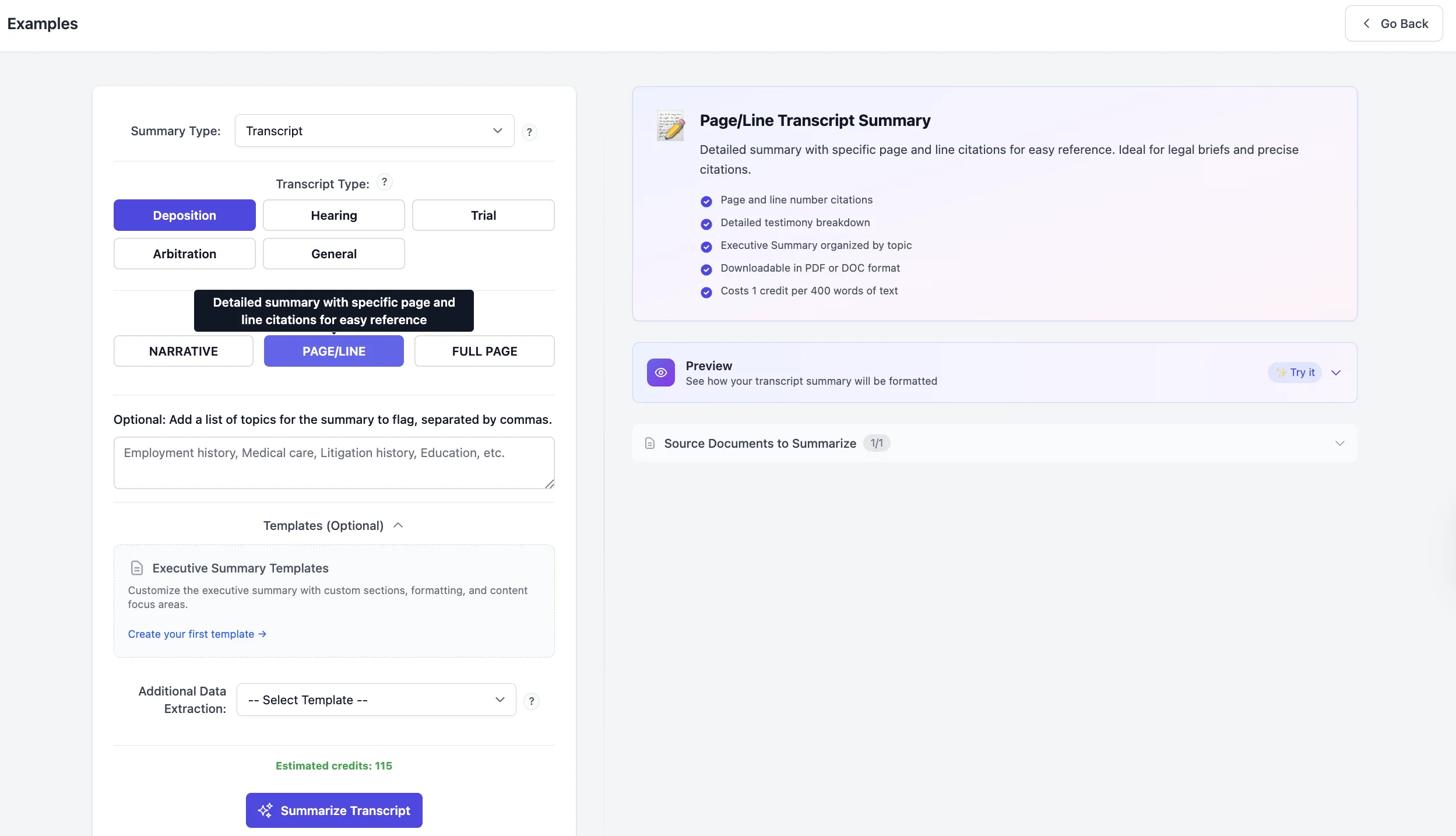
4) Does the structure match litigation prep use (not generic narrative recap)?
Depositions are not essays. Reviewers prefer output they can lift into real work:
- clear topic areas tied to what the team is preparing
- key testimony points with page-line references
- names/roles and who was present when it matters
- points that drive next actions (follow-up questions, issues to flag, testimony to use)
Standard chronological summaries work for complete record review. Issue-based summaries (organized by topics you define) work better when you’re preparing specific motions or witness prep and need focused output fast.
Dodon.ai supports both approaches, so reviewers can choose the format that matches their immediate prep need.
Reviewer tell: the summary supports “scan then drill down,” not “read end-to-end.”
5) Does the output help reviewers catch “review risk” early?
Under deadline, reviewers look for places where they should verify more carefully:
- testimony that sounds like an admission
- timeline claims that will be reused
- wording that could be misread without context
- statements that may matter later in drafting or prep
This isn’t about claiming automatic detection of every pattern. It’s about whether the software makes it easy to spot-check the risky parts fast and then continue.
6) Can the team export into the formats they already use?
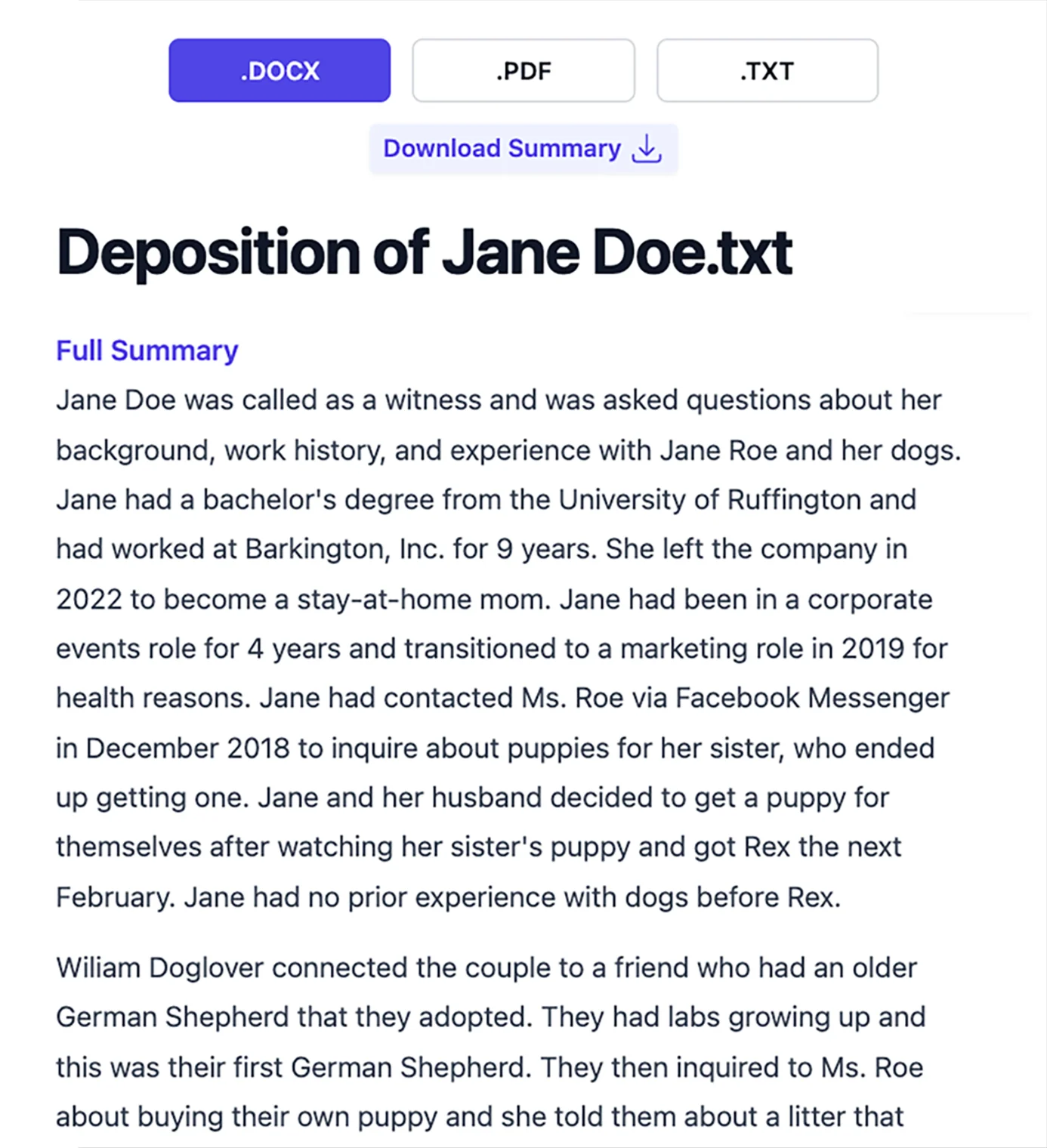
If the summary is useful, it will be shared. Reviewers check export options early because it signals whether the tool fits existing workflows.
Common expectations:
- Word (.docx) for editing and collaboration
- PDF for sharing and reference
If export is limited or messy, the summary becomes trapped in the platform.
7) Does the tool stay within defensible boundaries (no hype, no overreach)?
Reviewers are allergic to “magic” claims. The software should not imply it replaces legal judgment or produces courtroom evidence.
Credible positioning is:
- it speeds up prep
- it supports verification
- it provides citations for spot-checking
- it reduces repetitive first-pass work
That’s how litigation teams adopt software: practical, cost-conscious, and measured.
See How Page-Line Citations Work
Upload a deposition transcript. Generate a summary with page-line citations. Spot-check the output in under 5 minutes.
View sample deposition summary output →
Deposition Summary Verification: Standard Checklist for Legal Teams
If you want to standardize safe use for deposition summaries, publish this internally:
Spot-check loop (5–8 minutes):
- Pick 3–5 case-critical points (liability, timeline, admissions).
- Open each page-line reference and read the testimony in context.
- Confirm names/roles are consistent where it matters.
- Flag any ambiguous wording that needs deeper review.
- Export and share only after the quick spot-check is complete.
This matches how teams operate under deadline: verify the parts that matter most, then move.
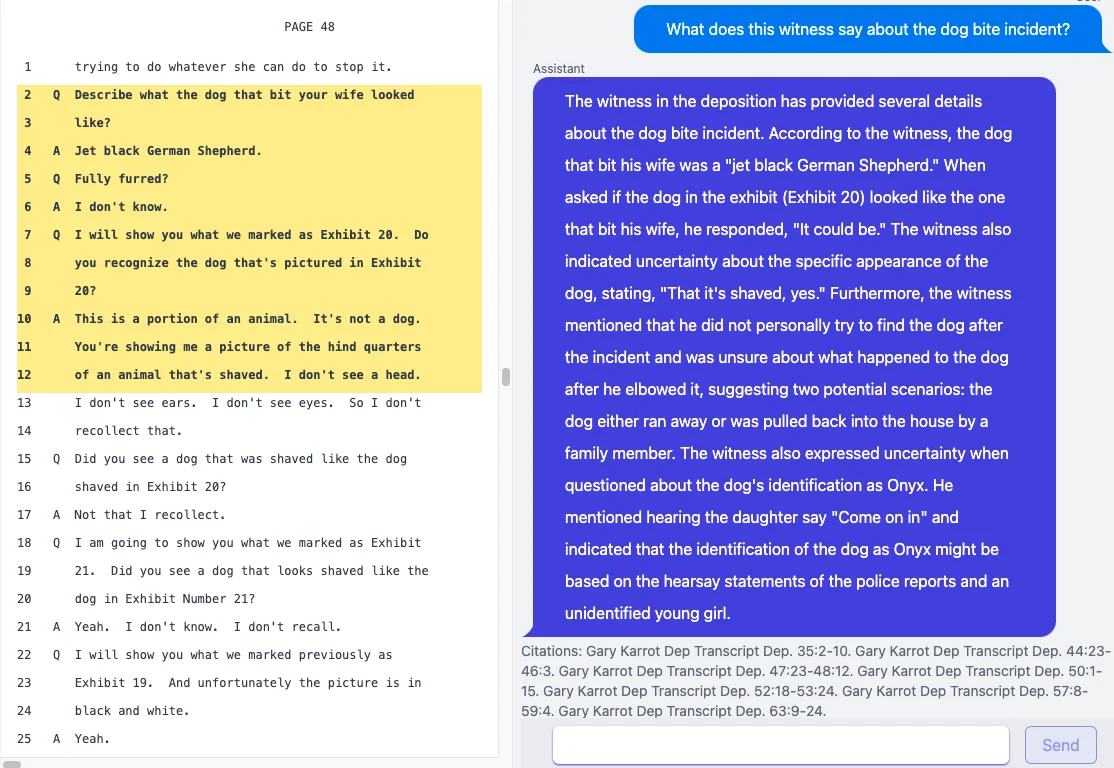
What “good” sample output looks like (format, not the facts)
A reliable excerpt generally looks like this:
Topic: Notice of Hazard Summary point: Witness states they warned a supervisor about the hazard two days prior. (p. X:Y–X:Z) Support: Reviewer can open the cited testimony and confirm wording in context. (p. X:Y–X:Z)
Why this format works:
- reviewers can scan quickly
- each material statement is anchored to a page-line reference
- it’s easy to reuse in prep notes and outlines once verified
Common Questions About Deposition Summary Software Accuracy
“AI isn’t accurate enough for legal work.”
Accuracy claims don’t solve this. Verification solves it.
The reviewer standard is: “Show me the page-line references so I can confirm.”
“We already have staff doing this.”
Most teams aren’t trying to replace staff. They’re reducing repetitive first-pass work and speeding up citation verification under deadline. For more on where manual workflows break down, see 3 Mistakes in Manual Summaries (and How to Avoid Them). For a broader look at AI tools that support paralegal workflows beyond deposition summaries, see AI tools every paralegal should know for case preparation.
“I don’t want a new system to learn.”
Reviewers adopt tools that match familiar behavior: upload transcript → choose summary format → generate → spot-check → export.
“What about security?”
For deposition and medical-legal work, “secure and compliant” is a baseline expectation. Reviewers should confirm the platform’s security documentation and contractual terms meet firm requirements before uploading documents.
Where Deposition Summary Software Fits Best
The strongest fit is repeatable deposition volume, especially where teams need consistent outputs across matters:
Personal injury and medical malpractice firms handling 20+ depositions per month need consistent page-line cited summaries for settlement demand packets and motion practice. Standard chronological summaries help newer associates learn case facts; issue-based summaries help senior attorneys prep for specific hearings.
Insurance defense teams managing high-volume caseloads need standardized deposition summaries that travel across matter teams. Consistent formatting and citation structure makes handoffs cleaner and reduces prep duplication when coverage counsel reviews case strategy.
Litigation support vendors reducing turnaround time and cost-per-summary can deliver faster outputs without sacrificing citation quality. Page-line references make QA verification faster and reduce client revision requests.
Trial teams building outlines and witness prep packets under deadline need fast access to verified testimony points. Issue-based summaries organized by key topics (liability, damages, credibility) pull the relevant testimony without forcing the team to re-scan chronological records.
If your workflow includes preparing to challenge testimony, look for purpose-built tools that support Impeachment Analysis (pulling and verifying conflicting statements with citations) rather than trying to force contradictions work into a generic summary. For a full evaluation checklist covering pricing models, output formats, and security requirements, see choosing deposition summary software: a litigator’s buyer’s guide.
Deposition Summary Software Pricing: What Legal Teams Actually Pay
Most litigation teams evaluate deposition summary software against two costs:
- Staff time cost – What you pay associates or paralegals per summary (multiply hourly rate × hours spent)
- Vendor cost – What you pay litigation support vendors per page or per summary
Dodon.ai pricing starts at $25/month (billed annually)—typically 30–70% less than outsourced per-summary costs for teams handling regular deposition volume.
FAQ
Do I have to trust the software’s summary?
No. Reviewers rely on page-line references and spot-check behavior. The software should make verification fast and standard.
Can I export to Word or PDF?
Yes. Dodon.ai summaries export to Word (.docx) and PDF with page-line citations preserved, so you can edit, share, and paste verified points directly into briefs and outlines.
Does it work with scanned transcripts?
If transcripts are scanned, the key question is whether the system can extract readable text. If it can, it can generate summaries and attach page-line references for spot-checking.
How long does it take to generate a deposition summary?
Most deposition summaries generate in 3–8 minutes depending on transcript length. The time savings comes from verification speed—5–8 minutes to spot-check instead of 45–60 minutes to manually cross-reference.
What’s the difference between chronological and issue-based summaries?
Chronological summaries follow the deposition order (useful for complete record review). Issue-based summaries organize testimony by topics you define (faster for targeted prep like motion practice or witness preparation).
Verify It Yourself
Upload a deposition transcript. Generate a page-line cited summary. Spot-check the output in under 5 minutes. Start free trial