
AI deposition summaries are only useful if reviewers can confirm what they’re relying on. Research from the University of Minnesota confirms that AI improves the speed and quality of legal tasks, but those gains depend on verification. In real litigation prep, summaries move fast—from first review to outlines to internal memos—and once they circulate, assumptions harden quickly. That’s why experienced teams don’t ask whether a summary is “accurate.” They ask whether it can be verified before use.
Verification, not automation claims, is what determines whether a deposition summary is safe to rely on.
Why teams hesitate to rely on AI deposition summaries
Paralegals and associates aren’t skeptical of summaries themselves. They’re skeptical of unverified summaries.
Common failure points show up repeatedly:
- Summaries circulate before spot-checks
A draft gets shared internally, then reused, without anyone confirming the testimony. - Statements lack clear sourcing
Language sounds right, but no one can quickly point to page and line in the transcript. - Time pressure replaces confirmation
Deadlines push teams to trust summaries instead of reopening a 200–300 page deposition.
When something goes wrong, the issue isn’t that a summary existed. It’s that no one verified it before relying on it.
What breaks in manual deposition review
Most teams already know how to verify testimony. Manual workflows make it hard to do consistently.
Memory-based trust
Reviewers rely on recall—“I remember that answer”—instead of reopening the transcript.
Missed page-line checks
Citations get added late, sometimes by someone who didn’t read the original exchange.
Shortcut behavior under deadlines
Teams trust summaries because re-reading source pages feels too slow.
Manual review doesn’t fail because teams don’t care about accuracy. It fails because verification takes too much time. These workflow breakdowns mirror the patterns described in 3 Mistakes in Manual Summaries (and How to Avoid Them).
The verification loop teams actually use
High-performing litigation teams follow the same loop, whether or not it’s written down.
- Start with the deposition summary
- Check page-line citations
- Confirm testimony on the source page
- Only then rely on it or share it
This loop is how teams maintain AI deposition summary accuracy under real deadlines.
What verification looks like in practice
1. Review the summary with page-line citations visible
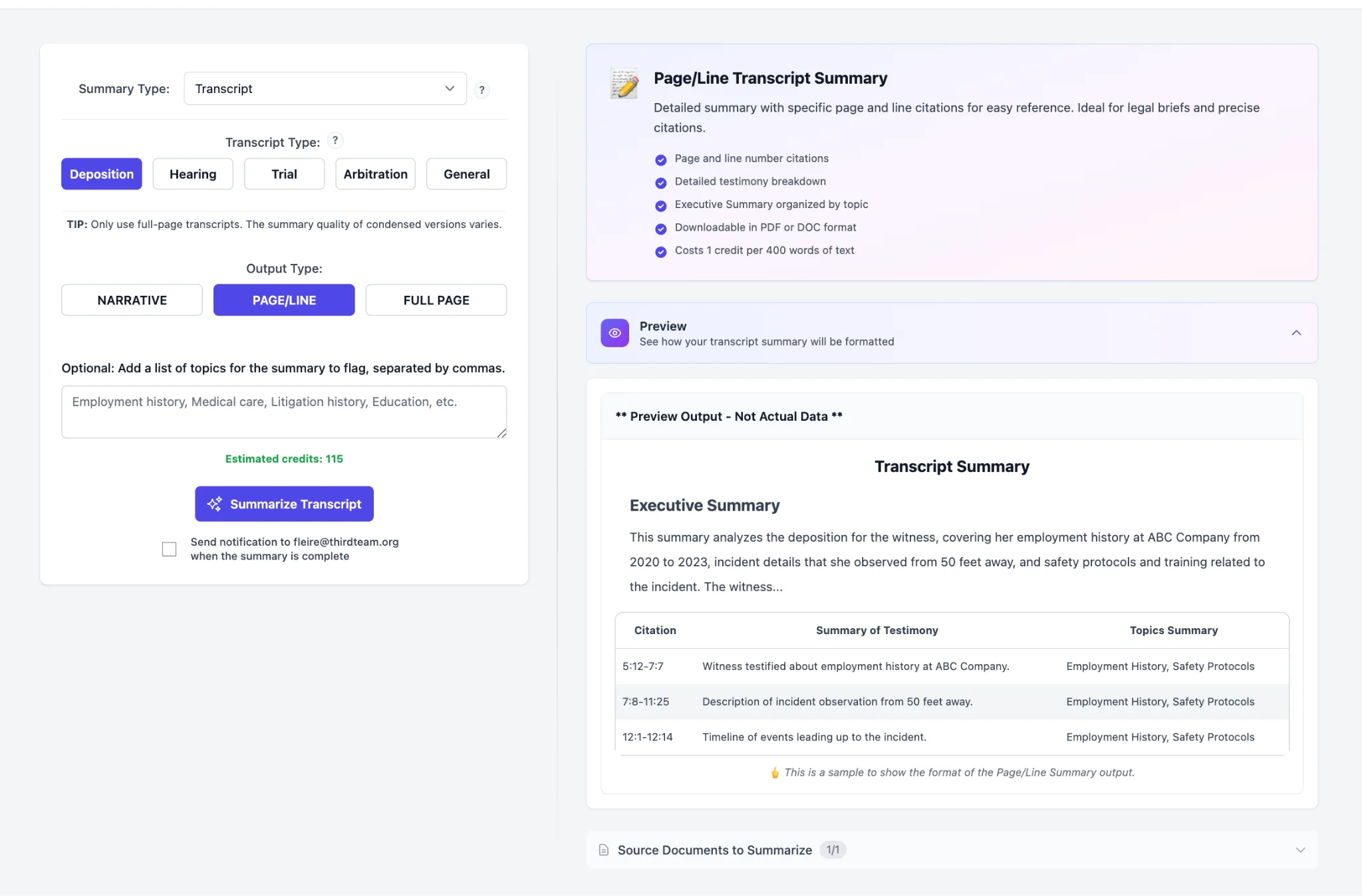
Reviewers start with a structured deposition summary where each material statement includes page and line references. This allows immediate triage: which facts matter, and which ones need confirmation.
Page-line citations aren’t a nice-to-have. They’re the entry point to verification. For a full explainer on the citation format and why it matters, see Page-Line 101: What Your Partner Means When They Ask for Citations.
2. Click the citation to confirm testimony on the source page
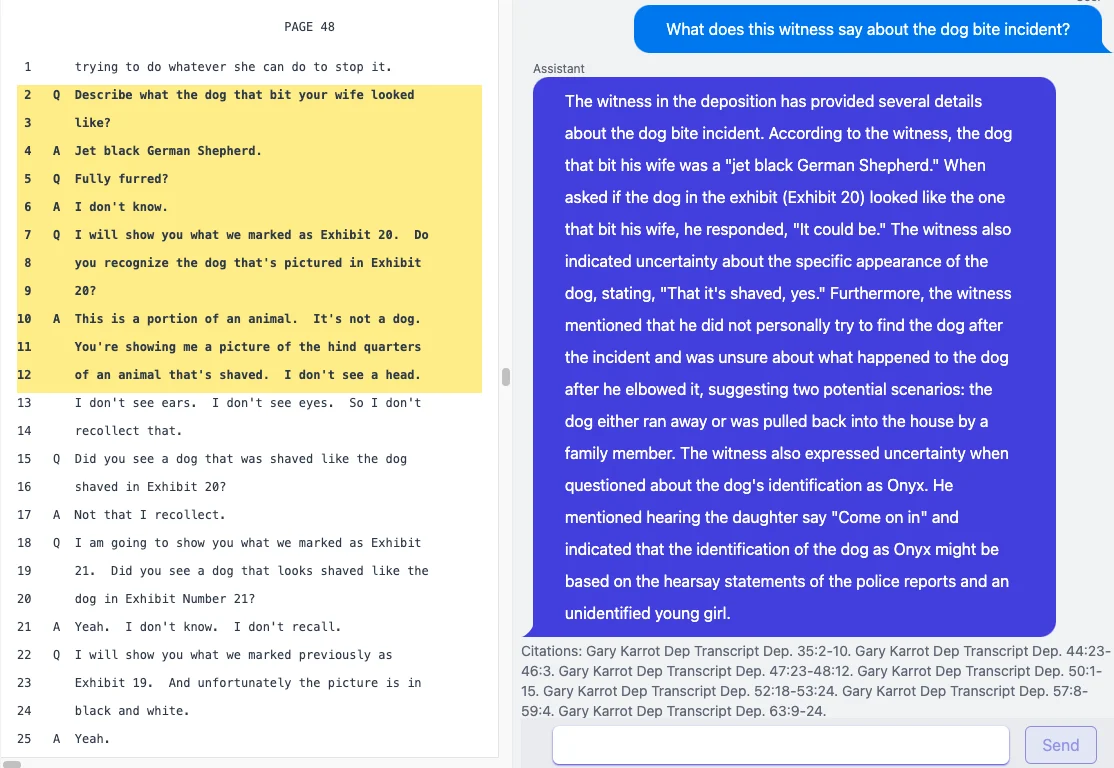
Instead of scrolling or searching manually, reviewers open the cited page directly and read the testimony in context. This is where assumptions get corrected and wording is confirmed.
Verification happens here, not later.
Role-based verification in review workflows
Paralegals: verify before handoff
Paralegals spot-check summaries, confirm key page-line citations, and flag unclear or ambiguous testimony before attorneys rely on it.
Associates: confirm issue-critical testimony
Associates focus on testimony tied to liability, causation, or damages, jumping directly to cited pages instead of rereading entire transcripts.
In both cases, verification happens before summaries influence outlines, prep notes, or strategy discussions.
How teams verify deposition summaries with Dodon.ai
Dodon.ai is built around this verification workflow, not around blind trust. Teams can now use software designed for AI deposition transcript review to move from summary to source page without friction.
- Page-line citations by default
Deposition summaries present citations alongside statements so reviewers always know where to look. - Click-to-source review
Citations open the exact transcript page for fast confirmation. - Export only after verification
Teams review and spot-check first, then export summaries in the formats they already use for litigation prep and discovery.
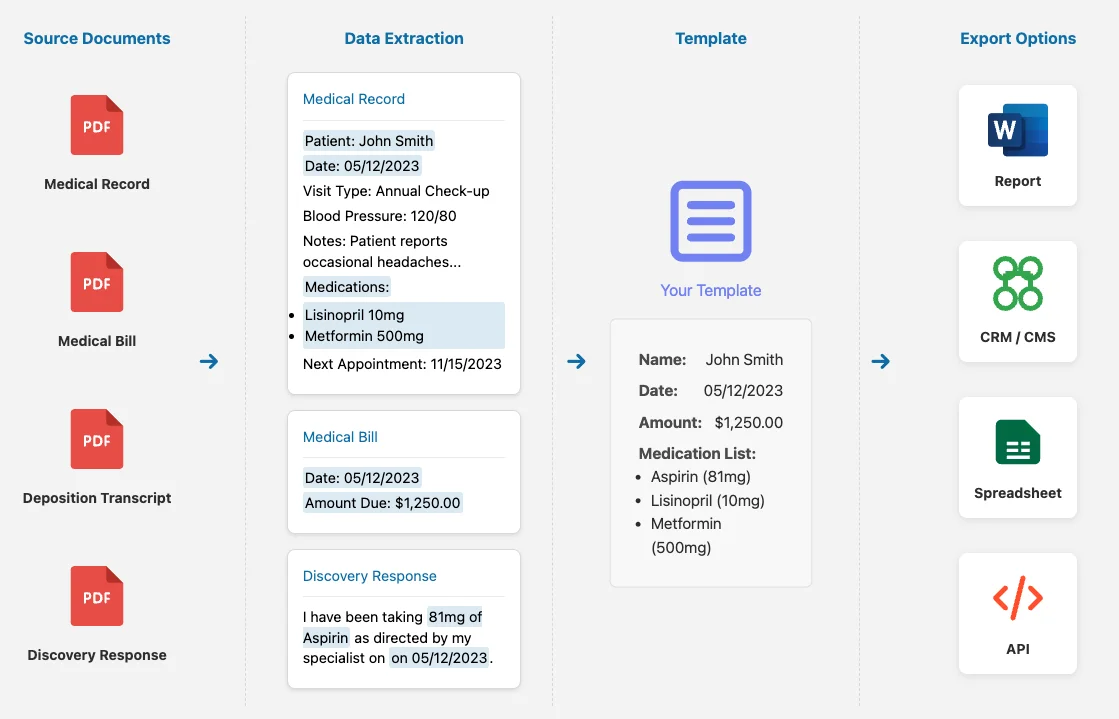
This keeps the trust boundary clear: summaries are verified before they leave the system. For teams handling sensitive medico-legal content, Dodon.ai also enforces zero data retention and strict privacy safeguards throughout the process.
Failure avoided when verification is built in
When verification is frictionless, teams avoid common problems before they surface:
- Lower audit risk, because sources are always visible
- Fewer fact errors, caught early instead of reused later
- More confidence under deadline, without reopening full transcripts
Verification doesn’t slow teams down. It prevents speed from turning into exposure.
Final word
AI deposition summaries are most valuable when they’re easy to verify. Trust comes from page-line citations, source-page access, and review-first workflows—not from promises about accuracy.
Software that supports verification allows teams to move faster without guessing, which is exactly what litigation prep demands.
View a cited sample to see how deposition summary verification works in practice.
FAQs
How do teams verify AI deposition summaries?
They review summaries with page-line citations, open cited transcript pages to confirm testimony, and spot-check key statements before sharing.
What if a citation is wrong?
Visible citations make issues easy to catch and correct before summaries are reused.
Can every statement be verified?
Yes. When summaries include page-line citations, every material statement can be checked against the transcript.